

MV RegClean is a great tool for keeping your computer running smoothly. It can scan your system, detect invalid entries, and provide you with a list of issues to review. You can then decide whether to delete or fix them, and it even allows you to create a backup of each entry before eliminating it. It's easy to use and can help improve the performance and stability of your system.
MV RegClean 5.5 is a registry cleaner for Windows.
It cleans and repair registry problems, that are often the cause of crashes, slow performance and error messages.
MV RegClean 5.5 accomplishes this by repairing invalid registry entries and removing orphaned references. Of course, you can make backups of the registry to revert changes if needed.
The program is compatible with every 32 and 64 bits Windows.
The initial screen has three buttons: Start, Backup and Options.
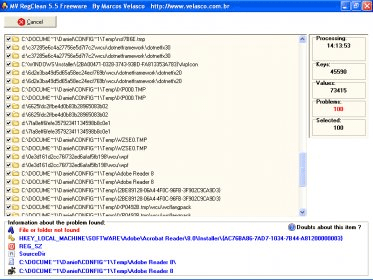
Pressing the "Start" button, the program will begin to scan your registry with the default settings. Once the scan is finished, MV RegClean will show you its results and ask you what to do with the found issues. You can then remove the selected items (all, by default) or choose what to remove by hand.
By default every scan will store a registry backup before changing anything. If something goes wrong, you can revert your system registry to its initial state using the "Backup" button and selecting the proper backup file.
In "Options" you can set the program´s appearance, search for updates or choose if you want a backup made before every scan.






Comments (5)